






Last updated: November 2026
- BC.Game Complaints at a Glance
- Why Is My BC.Game Withdrawal Pending?
- Why Can't I Withdraw From BC.Game?
- What to Do if a BC.Game Deposit Is Not Credited?
- Why Is My BC.Game Account Restricted?
- How Do I Contact BC.Game Support?
- How Long Does BC.Game Take to Respond?
- How Do I File a Complaint With BC.Game?
- What if a BC.Game Complaint Is Not Resolved?
- Sources and Last Checked
- FAQs
Got a problem with your account? You are not alone, and most BC.Game complaints fall into five groups: withdrawals that stay pending, verification holds, deposits that are not credited, bonus and wagering disputes, and account restrictions. Each one has common causes and a first step, and our support team handles all five through live chat, the help centre and email.
Want licence and operator details? See Is BC.Game legit? For the full platform overview, read our BC.Game review.

BC.Game Complaints at a Glance
Usual cause: KYC, 2FA, uncleared wagering, network or bank delays. First step: check your withdrawal history.
Usual cause: verification not finished, bonus wagering open, deposit not confirmed. First step: finish KYC and check bonus status.
Usual cause: blockchain confirmations, wrong network. First step: look up the transaction on chain.
Usual cause: duplicate accounts, location, security checks. First step: contact support with your details.
Usual cause: ticket volume, missing details, security reviews. First step: send one complete ticket with IDs.
Live chat runs 24/7, the help centre is at help.bc.support and the complaints emails are [email protected] and [email protected].
| Issue | Usual cause | First step |
| Withdrawal pending | KYC, 2FA, uncleared wagering, network or bank delays | Check your withdrawal history |
| Cannot withdraw | Verification not finished, bonus wagering open, deposit not confirmed | Finish KYC and check bonus status |
| Deposit not credited | Blockchain confirmations, wrong network | Look up the transaction on chain |
| Account restricted | Duplicate accounts, location, security checks | Contact support with your details |
| Support slow to reply | Ticket volume, missing details, security reviews | Send one complete ticket with IDs |
Why Is My BC.Game Withdrawal Pending?
Your BC.Game withdrawal usually stays pending for one of six reasons: KYC is not finished for a first withdrawal, a 2FA or security step is open, bonus wagering is not cleared, your latest deposit is not yet confirmed on the blockchain, the destination details are wrong, or the blockchain or bank is slow.
KYC must be completed before the first payout. Missing or unclear documents add time.
2FA prompts and confirmation checks delay approval if they are not completed straight away.
Funds tied to an active promotion stay locked until wagering is cleared.
A payout cannot start until your latest deposits are confirmed on the blockchain.
A wrong wallet network, wrong bank details or missing fields can trigger a review.
Blockchain congestion slows crypto. Banks may not move funds outside their working schedule.
What to Do About a Pending Withdrawal
- Check the status in your withdrawal history.
- Confirm the destination address, network or bank details.
- For crypto, confirm the transaction on chain once it is issued.
- For fiat, allow for normal bank processing before you escalate.
- If your 2FA code is rejected, your device time may be off. Use the “Time correction for codes” option in your authenticator app.
- Contact support with your withdrawal ID, method, currency and timestamp.
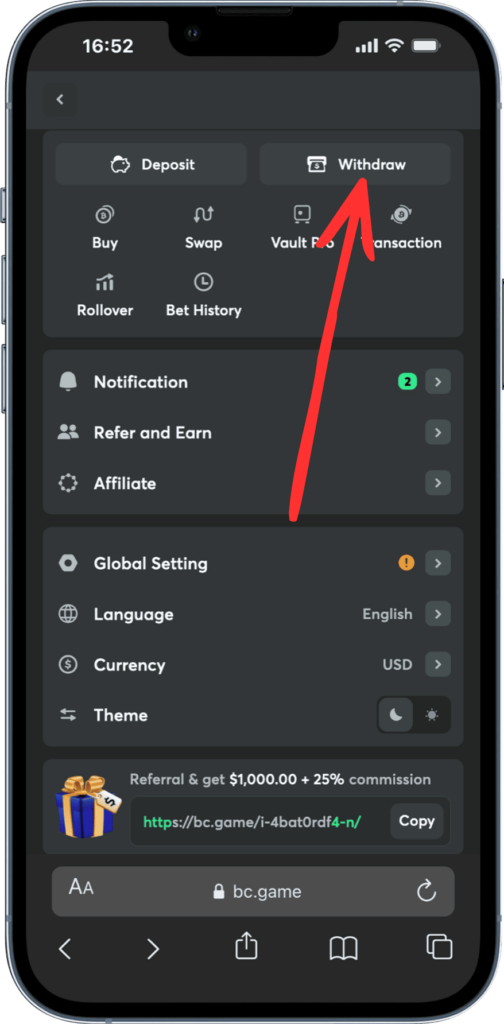
Our BC.Game withdrawal guide walks you through each step. Playing from Nigeria? Use our Nigeria withdrawal guide.
Why Can’t I Withdraw From BC.Game?
You cannot withdraw from BC.Game while identity verification is incomplete, while bonus wagering is still open, or while your account is under a security or duplicate-account review. Our terms of service allow us to restrict payments until your identity and location are verified, so clearing these checks is the way forward.
- Our withdrawal guide states that KYC is required before the first withdrawal.
- Extra checks can be requested for large cash-outs or unusual activity.
- Bonus BC Dollars (BCD) must be unlocked through gameplay and moved to your main balance before they can be withdrawn.
- For naira payouts, the name on the bank account must match the name on your BC.Game profile exactly.
- If our security team finds more than one account, pending withdrawals may be paused for a review.
What to Do if You Cannot Withdraw
- Complete verification as soon as it is requested, with clear and complete documents.
- Check your wagering progress and bonus status in your account.
- Use payment methods and accounts in your own name.
- Keep one account only.
- Ask our support team which check is open, and quote your withdrawal ID.
What to Do if a BC.Game Deposit Is Not Credited?
If your BC.Game crypto deposit is not credited, first check the transaction on a block explorer. A deposit only appears in your balance after the network confirms it. If the transaction is confirmed but still missing, contact our support team with the transaction hash, coin, network, amount and time.
- Confirmations: a crypto deposit is a blockchain transaction and settles only after network confirmations.
- Wrong coin or network: the coin and network must match the deposit address in your cashier. Our Nigeria guide warns that funds sent on the wrong network may be lost.
- Your own cashier only: send deposits only to the address shown in your BC.Game cashier.
Our BC.Game deposit guide explains each deposit method step by step.
Why Is My BC.Game Account Restricted?
Your BC.Game account is usually restricted because of duplicate accounts, an open security check, a restricted location or an active self-exclusion. Our terms forbid multiple accounts and do not allow players located in the restricted locations listed in the terms.
- Duplicate accounts: pending withdrawals may be paused for a review.
- Security checks: a flagged account may need to reconfirm details before it can withdraw.
- Location: restrictions come from the terms of service.
- Self-exclusion or cooling-off: an account under self-exclusion or a cooling-off period is locked for the chosen period. See the responsible gambling policy for details.
Check our guide to countries where you can play BC.Game for your location. If the reason is still not clear, contact support with your account details.
How Do I Contact BC.Game Support?
You can reach our support team through live chat on the website, through the BC.Game help centre at help.bc.support, and by email at [email protected] or [email protected]. We also run official Telegram and Discord channels, and VIP players have dedicated managers inside their accounts.
| Channel | Where | Best for |
| Live chat | On the BC.Game website | Quick questions and status checks |
| Help centre | help.bc.support | Guides and tickets |
| [email protected] and [email protected] | Written complaints | |
| Telegram and Discord | Official links page | Community updates |
| VIP manager | Inside your account | VIP players |
Watch out: fake support accounts copy the BC.Game name. Use only the channels above, and never share your password, 2FA codes or wallet seed phrase.

How Long Does BC.Game Take to Respond?
Replies can vary. As our own support article explains, replies can slow down when ticket volume is high, when a ticket lacks account details, or when a security or payment review is still open.
- Send one ticket per issue. Duplicate tickets can be queued or merged.
- Write from the email address linked to your account.
- Include your username, transaction ID and screenshots.
- Check your spam folder for replies.
Read the full article: BC.GAME Support Not Responding: Why It Happens and How to Fix It.
How Do I File a Complaint With BC.Game?
To file a complaint, email our customer service at [email protected] or [email protected], or open a ticket through live chat or the help centre. Describe the issue once and include every ID, amount, currency and timestamp, so we can review it.
- Describe what happened and what outcome you want.
- Add the withdrawal ID or transaction hash, method, currency, amount and time.
- Attach screenshots of the cashier or error message.
- Keep chat transcripts and ticket numbers.
What if a BC.Game Complaint Is Not Resolved?
If your complaint is not resolved through support, you can escalate it to CADRE, BC.GAME’s ADR provider. You will find licence details on our BC.Game licence overview.
Sources and Last Checked
Every fact on this page comes from the sources below. Terms and offers can change. If anything here differs from the cashier or the current terms, the cashier and terms apply.
| Source | What it confirms | Checked |
| BC.Game licence overview | Operator, licence number, regional brands and permits | November 2026 |
| bc.game/licenses | Official licence disclosure on the main site | November 2026 |
| Whitepaper licence page | Operator, Anjouan licence ALSI-202410011-FI1, link to the regulator’s validation page | November 2026 |
| BC.Game terms of service | Restricted locations, KYC rights, complaints contact | November 2026 |
| Responsible gambling policy | 18+ rule, self-exclusion, cooling-off | November 2026 |
| BC.Game help centre | Support articles and contact options | November 2026 |
| BC.Game blog: Support Not Responding | Why support replies slow down and how to fix it | November 2026 |
| Official links page | Official Telegram, Discord and social channels | November 2026 |
| BC.Game withdrawal guide | KYC before first withdrawal, payout steps | November 2026 |
| Nigeria withdrawal guide | Confirmation rule, name match, wrong-network risk | November 2026 |
FAQs
Your BC.Game withdrawal usually stays pending because KYC is not finished, a 2FA step is open, bonus wagering is not cleared, your latest deposit is not yet confirmed on the blockchain, the destination details are wrong or the network is busy. Check your withdrawal history, then contact our support team with the withdrawal ID. See our BC.Game withdrawal guide.
You cannot withdraw while KYC is incomplete, while bonus wagering is still open, or while your account is under a security or duplicate-account review. Our terms allow us to restrict payments until your identity and location are verified.
Check the deposit on a block explorer and confirm the coin and network match your cashier address. If the transaction is confirmed but not credited, contact our support team with the transaction hash, coin, network, amount and time.
Our live chat runs 24/7, but replies to tickets and email can vary. Replies can slow down when volume is high, details are missing or a security review is open. One complete ticket with your IDs gets you the fastest answer.
Email [email protected] or [email protected], or open a ticket through live chat or the help centre. Include the relevant IDs, amounts, currency and timestamps, plus screenshots.
You can reach us 24/7 through live chat, the help centre at help.bc.support and email at [email protected] or [email protected]. Our official Telegram and Discord links are listed in the BC.Game whitepaper.